CI/CD for Databricks Pipelines with Databricks Asset Bundles (DAB) and Azure DevOps
A Software Product Engineer, Cloud enthusiast | Blogger | DevOps | SRE | Python Developer. I usually automate my day-to-day stuff and Blog my experience on challenging items.
Introduction
If you've spent any time managing data pipelines in the real world, you know the pain of deploying changes manually — copy-pasting notebooks, praying nothing breaks in prod, and maintaining that one giant script nobody dares to touch. I've been there, and I'll be honest: it's not fun.
At some point, we decided enough was enough. We adopted Databricks Asset Bundles (DAB) to bring the same software engineering rigour we apply to application code — version control, code review, automated testing, and environment promotion — to our Databricks workloads.
This post walks through exactly how we built a fully automated CI/CD pipeline using DAB and Azure DevOps, and some of the hard-won lessons we picked up along the way.
What Are Databricks Asset Bundles?
Databricks Asset Bundles are a YAML-based configuration framework for defining and deploying Databricks resources — Delta Live Tables (DLT) pipelines, jobs/workflows, SQL warehouses, and permissions — as code. Think of it as Terraform, but purpose-built for Databricks.
Resources are declared in .yml files and deployed via the databricks CLI. This makes them version-controllable, reviewable, and CI/CD-friendly right out of the box. Once you start using it, going back to manual deployments feels unthinkable.
Our Bundle Structure
Here's how our project is laid out. The folder structure itself tells a story — environments, jobs, pipelines, and warehouses each have their own space, all orchestrated from a single root bundle file:
<your-project>/
├── databricks.yml              # Root bundle definition & targets (dev/test/prod)
├── azure-pipelines.yml         # Azure DevOps CI/CD pipeline
└── resources/
    ├── environments/
    │   ├── dev.yml             # Dev-specific variables (catalog, schema, storage)
    │   └── prod.yml            # Prod-specific variables
    ├── jobs/
    │   ├── wf_<domain_a>.yml   # Workflow: triggers a single DLT pipeline
    │   ├── wf_<domain_b>.yml   # Workflow: orchestrates multiple DLT pipelines
    │   └── wf_<domain_c>.yml   # Workflow: SQL task-based job
    ├── pipelines/
    │   ├── pl_<entity_a>.yml   # DLT: Bronze → Silver → Gold
    │   ├── pl_<entity_b>.yml   # DLT: another domain pipeline
    │   └── ...                 # (one YAML per domain/entity)
    └── sql_warehouses/
        └── cl_sql_xsm_stage.yml  # Serverless SQL warehouse (X-Small)
One pipeline, one YAML. Clean, predictable, and easy to find what you're looking for.
Multi-Target Configuration
This is where DAB really earns its keep. Instead of maintaining separate repos or complex branching strategies per environment, we use targets — environment-specific configurations all sitting inside a single databricks.yml:
Target | Mode | Workspace | Use Case |
|---|---|---|---|
| development | Dev workspace | Individual developer sandboxes |
| development | Dev workspace | Shared dev environment (CI on feature/dev branch) |
| development | Test workspace | QA / pre-production |
| production | Prod workspace | Live production |
Each target overrides variables like the Unity Catalog name, data lake schema, and environment label. The same pipeline YAML works across all environments — zero code changes required when promoting between them.
# databricks.yml (simplified)
targets:
  dev:
    mode: development
    workspace:
      host: https://<your-dev-workspace>.azuredatabricks.net/
    variables:
      pipeline_uc_catalog:
        default: dev_<your_catalog>

  prod:
    mode: production
    workspace:
      host: https://<your-prod-workspace>.azuredatabricks.net/
    variables:
      pipeline_uc_catalog:
        default: prod_<your_catalog>
Pipeline Resource Design
DLT Pipelines
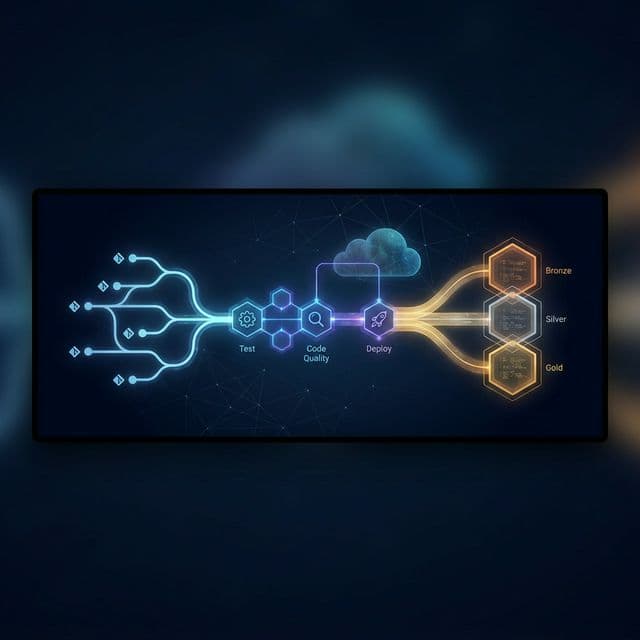
Each DLT pipeline follows the Bronze → Silver → Gold medallion architecture. Common utilities are shared across all pipelines (think a shared loader module and init file). Pipeline-level configs — catalog names, schema names, storage paths — are injected via variables at deploy time, so there's nothing hardcoded:
# resources/pipelines/pl_<entity>.yml (simplified)
resources:
  pipelines:
    pipeline_pl_<entity>:
      name: pl_<entity>
      configuration:
        pipeline.uc_catalog: ${variables.pipeline_uc_catalog.default}
        pipeline.uc_schema_brz: ${variables.pipeline_uc_schema_brz.default}
      libraries:
        - file: { path: ../../src/code/bronze/<entity>_bronze_dlt.py }
        - file: { path: ../../src/code/silver/<entity>_silver_dlt.py }
        - file: { path: ../../src/code/gold/fct_<entity>_dlt.sql }
      photon: true
      serverless: true
Jobs / Workflows
Jobs wire DLT pipelines together. We use two patterns depending on the use case:
Pipeline task jobs — trigger DLT pipelines by resource reference. Good for orchestrating multiple related pipelines in sequence.
SQL task jobs — run SQL scripts against a SQL warehouse, with conditional full-refresh logic built in.
The Azure DevOps CI/CD Pipeline
Our azure-pipelines.yml defines three stages that execute on every push to any of our active branches:
Push to branch
      │
      ▼
┌─────────────┐     ┌───────────────────┐     ┌─────────────────────────┐
│  Stage 1    │────▶│     Stage 2       │────▶│       Stage 3           │
│  Test       │     │  Code Quality     │     │  Deploy to Environment  │
│  (pytest)   │     │  (SonarCloud)     │     │  (DAB deploy)           │
└─────────────┘     └───────────────────┘     └─────────────────────────┘
Branch → Environment Mapping
Branch | Environment | Approval Required |
|---|---|---|
|
| None |
|
| Optional |
|
| Manual approval |
Simple and deliberate. Dev merges are instant; production deployments require a human to say yes.
Authentication
We use an Azure Service Principal with the AzureCLI@2 task to obtain a short-lived Databricks access token at deploy time. No secrets baked into YAML, no long-lived credentials lying around:
DATABRICKS_TOKEN=$(az account get-access-token \
  --resource 2ff814a6-3304-4ab8-85cb-cd0e6f879c1d \
  --query "accessToken" -o tsv)
Short-lived tokens via service principal is the way to go. It's one less thing to rotate manually.
Deploy Step
databricks bundle validate -t $(environment)
databricks bundle deploy -t $(environment) --auto-approve
--auto-approveis required in non-interactive CI/CD environments to bypass prompts for destructive actions like renaming or deleting resources. Skip it and your pipeline will hang indefinitely — ask me how I know.
Key Lessons Learned
These are the things I wish someone had told me when we started. Saving them here so you don't have to learn them the hard way:
Name resources without environment suffixes. Let DAB targets handle environment context — use
pl_orders, notpl_dev_orders. The moment you bake the environment into the name, renames will break your CI/CD and your day.Use variable references consistently. Never hardcode catalog names or storage accounts inside pipeline YAMLs. Always use
${variables.*}so the environment config files are the single source of truth. It pays off every time you add a new target.--auto-approveis mandatory in CI/CD. The Databricks CLI will block on any destructive action when there's no interactive terminal. Always include this flag in your deploy command — you'll forget it at least once, and you'll remember it forever after.Serverless + Photon = simplicity. Serverless pipelines remove the need to manage cluster sizing in each pipeline config. Less boilerplate, fewer misconfigurations, faster pipelines. It's an easy win.
Event log per pipeline. Store pipeline event logs in a dedicated schema. It enables centralised monitoring across all DLT pipelines via a single Unity Catalog query — much better than hunting through individual pipeline UIs.
In the next blog
I can give a technical deep dive of the pipeline code and how we are using the Unity Catalog and Delta Live Tables to build the data platform.
Azure Devops pipeline
Deploying to data bricks using azure Devops